August 5, 2026
USA
Business Software

Gusto Review 2026

Gusto is an all-in-one integrated HR platform that covers payroll administration, automatic tax filing, employee onboarding, benefits management and time tracking. It’s built exclusively for US small & medium businesses with simple to medium payroll demands. Pricing starts at $49/month with tiered plans scaling up to $180/month for enterprise SMBs. Check Gusto Now What Is Gusto? Gusto ranks among America’s most widely used small business payroll & HR tools, designed to centralize every core workforce operation into a single dashboard. Instead of juggling separate software for payroll, taxes, insurance and staff management, Gusto unifies all workflows to cut manual admin work and reduce compliance risks for US-based teams. This review breaks down Gusto’s interface, core features, pricing tiers, pros & cons, ideal user profiles, competing alternatives, and real user feedback to help you decide if it’s the right HR solution for your business. Gusto Interface Overview Gusto’s UI prioritizes simplicity, split into two core navigation layers: a fixed sidebar for primary HR workflows and a top utility bar for quick access to search, notifications and account settings. Main Sidebar Navigation Modules People: Central employee/contractor profile hub, track compensation, roles and personal data Company: Business profile, bank accounts, company-wide HR policy configuration Payroll: Run regular/off-cycle payroll, view historical payment records, auto wage & tax calculation Time tools: Employee hour logging, overtime tracking, PTO requests synced directly to payroll Benefits: Manage health insurance, retirement plan enrollment and payroll deductions Taxes and compliance: Automated federal/state/local payroll tax filing, real-time regulation updates Reports: Visualized analytics for labor costs, turnover, compensation trends Supplementary menu sections include third-party app integrations, account settings, referral rewards, upgrade options and 24/7 help resources. Mobile App Support Gusto releases separate iOS & Android mobile apps for employers and staff: Employer app: Run payroll, approve timesheets/PTO, onboard new hires, manage team profiles Employee app: View pay stubs, access early payday advances, sign HR documents, log working hours, adjust benefit selections App Store rating: 4.8/5 (40,000+ reviews); Google Play rating: 4.4/5 (17,000+ reviews). Core Gusto Features Deep Dive 1. Automated Payroll Administration Gusto auto-calculates base wages, overtime, tax withholdings and benefit deductions to complete payroll processing in minutes. It supports flexible pay schedules, recurring automatic payroll runs, direct deposit payouts and downloadable payroll cost summary reports. 2. Tax Filing & Compliance Automation The platform eliminates manual tax paperwork by calculating, filing and submitting all federal, state and local payroll taxes on your behalf. It auto-updates to match changing tax legislation, generates year-end W-2 and 1099 forms, and stores digital copies for permanent access. 3. End-to-End Hiring & Onboarding Send legally compliant offer letters, collect digital signatures, auto-populate new hire tax forms, set up direct deposit accounts and distribute company policy documents all within Gusto’s hiring module. 4. Employee Benefits Administration Business owners can offer group health insurance, 401(k) retirement plans and supplementary perks through Gusto’s marketplace. Employees self-select benefits during open enrollment, with all deductions auto-synced to payroll each cycle. 5. Integrated Time Tracking & PTO Management Staff log hours, flag overtime and submit time-off requests in one unified tool; approved hours automatically feed into payroll to eliminate manual data entry and calculation errors. Managers can quickly review and approve full timesheet batches. 6. HR Document Storage & Performance Tools Secure cloud storage for all employee contracts, tax forms and HR records. Built-in self-review functionality lets team members set performance goals and submit feedback for manager one-on-one conversations. 7. Customer Support Channels Support available via live chat, email and phone; chat response speeds are 9x faster than email. Phone support operates only on weekdays, with after-hours calls routed to AI voice assistants. Premium plan subscribers unlock priority dedicated support and a personal HR advisor. Gusto Pricing Plans (2026) Plan Tier Monthly Cost Key Included Features Solo $49/mo Self-owner payroll, auto tax filing, S Corp compliance, Solo 401k, invoicing tools (for freelancers with zero staff) Simple $49/mo Single-state payroll, unlimited monthly payroll runs, tax filings, employee mobile app, contractor payment processing Plus $80/mo All Simple features + multi-state payroll, time tracking, shift scheduling, expense reimbursements, custom PTO policies, talent recruitment tools Premium $180/mo All Plus features + priority support, dedicated HR advisor, performance & compensation management, fully custom workforce analytics reports Individual add-ons (priority support, workers’ comp, advanced scheduling) can be purchased separately without full plan upgrades. Check Gusto Now ✅ Gusto Pros Ultra-intuitive, beginner-friendly dashboard All-in-one payroll, tax, HR, time & benefits suite Unlimited payroll runs on every plan tier Automatic multi-state tax compliance updates Clean mobile apps for employers and staff High G2/Capterra user ratings (4.6/5) ❌ Gusto Cons Base plan pricing starts at $49/month (costly for micro-businesses) No native support for international remote employees Phone support only available Monday–Friday When You Should Choose Gusto You run a US-based small/medium business with simple to moderately complex payroll workflows Your team operates across multiple US states and needs automated cross-state tax filing You hire both full-time W-2 employees and 1099 independent contractors You want to eliminate disjointed HR software and centralize all workforce tools in one platform When You Should Pick a Gusto Alternative Extremely tight budget: Patriot Payroll starts at $17/month plus per-user fees for unlimited payroll Large enterprise organizations: ADP Workforce Now delivers deeper enterprise analytics and compliance Global distributed teams: Deel specializes in multi-currency international contractor payroll Gusto vs Top Competitors Comparison Platform Starting Price G2 User Rating Gusto $49/month 4.6/5 (8,000+ reviews) ADP Custom quote only 4.4/5 (10,000+ reviews) Rippling $8/user/month + module fees 4.8/5 (14,000+ reviews) QuickBooks Payroll $88/month (Simple Start bundle) 4.4/5 (400+ reviews) Real User Feedback Breakdown On professional software review platforms G2 and Capterra, Gusto holds a consistent 4.6/5 star rating from over 8,000 verified business owners. Positive Feedback Highlights: Users repeatedly praise the simplified payroll automation, clean easy-to-learn interface, reliable tax filing automation and seamless employee self-service tools that cut admin hours weekly. Common Negative Complaints: Trustpilot scores average only 2.4/5, primarily due to slow customer support resolution times, inconsistent agent answers, rare payroll calculation errors and delayed direct deposit payouts reported

Read More
Software

Xero Review: Pros, Cons, Features & Pricing

 Xero is an affordable, cloud-based accounting software built for small to mid-sized businesses. It shines with advanced general ledger controls, streamlined invoicing, and unlimited user access across all plans. While its interface feels dated in places and customer support is limited, it remains one of the best value picks on the market, especially for service-based and contracting businesses. At a Glance Best for: Small businesses, freelancers, and service-based companies Starting price: $15/month (Early plan) Free trial: 30 days, plus 95% off first 3 months Standout feature: Unlimited users on every plan Top integration: Seamless Gusto payroll sync What Is Xero? Xero is a fully online accounting software platform designed for businesses of all sizes and industries. It was built to replace desktop bookkeeping tools with a cloud-native solution that you can access from any browser or mobile device. While it works for nearly any business model, Xero’s project tracking and job-costing features make it especially well suited for service-based contracting businesses that manage multiple clients and individual projects. One of its biggest differentiators is pricing: every plan includes unlimited user seats, which sets it apart from competitors like QuickBooks and FreshBooks that charge per additional user. For teams with multiple accountants or staff members, this can translate to massive savings. Key Features General Ledger Control Manage all company transactions, add custom accounts, and create advanced journal entries with auto-reversing dates. Invoicing & Bill Pay Create, approve, and email invoices directly from the platform. Pay bills and consolidate outstanding balances in one click. Project Time Tracking Track time per project with a built-in timer, then auto-generate invoices based on billable hours. Bank Reconciliation Securely connect bank accounts and reconcile transactions with suggested matches and bulk actions. Contacts Management Organize customers and suppliers, store banking details, and attach documents to contact records. Gusto Payroll Integration Seamlessly sync with Gusto for full payroll processing. Transactions automatically flow into Xero books. Pros & Cons ✅ Pros Advanced, highly functional general ledger system Streamlined invoicing and bill payment workflow Low-cost plans with unlimited users on all tiers Excellent mobile app with core accounting features Strong bank reconciliation and bulk transaction tools 50+ customizable financial reports ISO 27001 and SOC 2 certified security ❌ Cons Limited customer support — email only, no phone No built-in employee time tracking for payroll Advanced analytics require paid add-on Multiple separate mobile apps can be confusing Xero Pricing & Plans Xero uses a straightforward three-tier pricing model. All plans include unlimited users — a major advantage over competitors. Pricing is month-to-month only; there is no annual discount. A 30-day free trial is available, plus a 95% discount for the first three months. Plan Price Best For Key Limits Early $15/month Sole traders & micro-businesses 20 invoices / 5 bills per month Growing $42/month Growing small businesses Unlimited invoices & bills; optional Inventory Plus Established $78/month Established businesses with multiple currencies Multi-currency, projects, expenses; optional Analytics Plus Xero vs QuickBooks vs FreshBooks: Cost Comparison The biggest financial advantage of Xero becomes clear when you compare pricing across multiple users. Since Xero includes unlimited seats, the gap widens dramatically as your team grows. Team Size Xero (Growing) QuickBooks (Plus) FreshBooks (Premium) 1 User $42/mo $115/mo $65/mo 3 Users $42/mo $115/mo $87/mo 5 Users $42/mo $115/mo $109/mo 10 Users $42/mo ~$350/mo (Advanced + extra seats) $164/mo Usability & Interface Xero’s interface is reasonably intuitive but inconsistent across different sections. The main dashboard is well designed, with a clean blue-and-white theme and a top navigation bar that puts key sections within easy reach. The home dashboard gives you an at-a-glance view of your business financial health: bank balances, outstanding invoices, cash flow trends, and upcoming bills. This is genuinely useful for quick daily check-ins. However, the Chart of Accounts page feels noticeably outdated compared to the rest of the software. It uses a denser, older design language that clashes with the modern dashboard. Given how frequently accountants access this page, it’s a surprising weak point. Overall navigation is mostly intuitive — buttons and submenus are generally where you’d expect them. That said, some common tasks (like finding customer support or setting up the Gusto integration) aren’t obvious and may require searching the help center. Mobile App The Xero Accounting mobile app (iOS and Android) is excellent. While it doesn’t include every deep accounting feature (you can’t edit the full chart of accounts or run advanced reports on mobile), it handles all the day-to-day tasks beautifully. The bottom-tab navigation splits into four sections: Dashboard, Sales, Purchases, and Contacts. You can create and send invoices, photograph receipts, reconcile transactions, view profit summaries, and manage contacts — all from your phone. Xero also offers three additional dedicated apps: Xero Verify — 2FA authenticator app for secure login Xero Projects — Job quoting, time tracking, and project invoicing on the go Xero Me — Employee self-service for payslips, expense claims, leave requests, and timesheets Having separate apps keeps each one focused but can feel fragmented for users who need all of the above. Core Functionalities Deep Dive General Ledger This is where Xero truly excels. The general ledger system is robust and packed with advanced features you’d expect from enterprise software. Adding new accounts is fast — a simple pop-up window lets you configure account type, code, name, and tax settings without page reloads. Journal entries support tax-inclusive or tax-exclusive amounts, auto-reversing dates for accruals, and file attachments for audit documentation. For growing businesses that need clean, audit-ready books, this level of control is a big win. Invoicing & Bill Pay Xero’s invoicing workflow is smooth and efficient. You can create an invoice, approve it, and email it to your client directly from the platform — no need to export PDFs and switch to your email client. A particularly smart touch: when creating a new bill for a supplier with existing outstanding purchase orders, Xero prompts you to copy line items over in one click. This is great for consolidating payments and avoiding missed balances. Time Tracking
Read More
E-commerce Software Technology

Webflow Review – All the Key Pros and Cons

What is Webflow? Webflow is an online platform that allows you to create your own website or online store without needing advanced coding skills. It operates as a cloud-based software as a service (SaaS) design tool, accessible through your web browser, and requires a subscription for usage. There are two ways to use Webflow: Design and host your website on Webflow’s servers, utilizing the Webflow editor for updates. Design a website with Webflow and export the code to host it on your own server. Most users prefer the first option as it offers reliability and ease of updating through Webflow’s content management system and style editor. The second option is usually chosen by professional web developers and agencies who prefer independent hosting and coding.Webflow provides customizable templates that can be tailored to your brand and services, enabling you to create visually impressive websites with unique features.Founded in 2013 and based in San Francisco, Webflow is positioned as a “no-code” web development tool, catering to both non-programmers and programmers alike. However, advanced users can also customize CSS, HTML, and JavaScript to further customize their websites. Who is Webflow For? Webflow is designed for a wide range of users, including: Small business owners: Webflow provides an affordable and user-friendly solution for small business owners who want to create their own websites or online stores without hiring professional developers. Web designers: Webflow offers a powerful design tool for web designers who want to create visually stunning and unique websites for their clients, with the flexibility of customizing the code. Web developers: Webflow caters to web developers who prefer a visual interface for designing websites and want the option to export the code for further customization or hosting on their own servers. Agencies: Webflow is popular among web design agencies that need a versatile platform for designing and managing websites for multiple clients, with the ability to export code and host independently. As for the number of Webflow users, the company does not publicly disclose exact figures. However, Webflow has gained significant popularity since its founding in 2013 and has a large user base that includes individuals, businesses, and agencies around the world. Webflow Pricing Webflow’s pricing can be confusing due to the three sets of plans they offer: Site plans, Ecommerce plans, and Workspace plans. Site plans and Ecommerce plans are similar to plans offered by other website builders like Wix and Shopify. They include hosting, a content management system (CMS), and the option to map a custom domain. Ecommerce plans also include tools for selling products online. Site plans are priced as follows: Starter: $0 Basic: $18 CMS: $29 Business: $49 Ecommerce plans are priced as follows: Standard: $42 Plus: $84 Advanced: $235 The differences between Site plans involve access to a CMS (Basic plan does not have CMS access), the number of editable CMS items, monthly visitors, storage space, and the number of users who can edit the site. The more expensive the plan, the more features and resources you get.   For Ecommerce plans, the differences involve the number of products you can sell, transaction fees, and staff accounts. Standard plan allows 500 products with a 2% transaction fee, Plus plan allows 5,000 products with 0% transaction fee, and Advanced plan allows 15,000 products with 0% transaction fee. Workspace plans, on the other hand, are geared towards professional web designers and agencies. These plans allow managing multiple sites and collaboration among multiple users. They also provide the option to export site code for self-hosting or handing over to a developer for further enhancements. There are six Workspace plans available: Starter: $0 Freelancer: $24 Core: $28 Agency: $42 Growth: $60 Enterprise: custom pricing Freelancer and Agency plans are designed for web design agencies, while Starter, Core, Growth, and Enterprise plans are intended for individuals and companies building their own sites. The differences between these plans involve the number of users who can work on a project simultaneously, the number of sites that can be managed, publishing permissions, ability to add custom code, ability to export site code, and level of security and customer support. It’s important to note that Workspace plans do not include hosting, CMS access, or domain mapping. To access these features, you need to purchase a Site or Ecommerce plan in addition to your Workspace plan.Although Webflow’s pricing structure may seem complicated, it’s worth noting that they offer many powerful features once you understand the different plans and their capabilities. Webflow Features Webflow is a powerful web design and development platform that offers a wide range of features to help you create professional, responsive websites with ease. Some of the key features of Webflow include: Visual Web Design Editor: Webflow’s visual web design editor allows you to design websites visually, without needing to write code. You can drag and drop elements onto the canvas, customize their styles, and see the changes in real-time. This makes it easy to create custom designs without coding skills. Responsive Design: Webflow allows you to create responsive websites that automatically adapt to different screen sizes, including desktops, tablets, and mobile devices. You can customize the layout, typography, and styles for different devices, ensuring a consistent user experience across all screen sizes. Custom Code: Webflow allows you to add custom HTML, CSS, and JavaScript code to your website, giving you full control over the design and functionality. This is especially useful for developers who want to create custom interactions, animations, or integrations with third-party services. CMS and E-commerce: Webflow has a built-in Content Management System (CMS) that allows you to create dynamic content-driven websites, such as blogs, news sites, and portfolios. You can also create online stores with Webflow’s E-commerce functionality, which includes features like product management, shopping cart, and payment integrations. Hosting and Publishing: Webflow provides hosting for your websites, and you can publish your websites with a custom domain or a Webflow subdomain. Webflow also offers SSL certificates for secure browsing, and you can easily update and manage your websites from

Read More
Software Technology

ZenBusiness Review – The Best LLC Service?

Converting your new business entity into a legal entity can be considered one of the most critical steps in making your dreams come true. This article is just for you if you want to avoid all that paperwork and hire a professional service to complete this step. In this article, we will review ZenBusiness, which has helped more than 300,000 businesses and companies to achieve a status of LLC or incorporation and gain legal bases for carrying out trades and related stuff. So let’s dive into the details. ZenBusiness Packages: Most of the services ZenBusiness provides are related to their packages which they will bill annually. They have a “Starter Package,” which comes at $0 + State Fees. Then there is their most popular package, which is available at $199 annually. They also provide a “Premium Package,” which comes at $299 over a year. They will also take a state fee which may differ according to the company’s location. Starter Package: This package suits entrepreneurs seeking a registered incorporation service to help them pursue their dreams. When you are on the road to becoming incorporated, you need a registered agent that will receive all those important documents on behalf of your business. With this starter package, ZenBusiness presents itself as that registered agent. As part of this package, they will provide a model of corporate bylaws to you, based on which you can decide the working system of your company. The package comes at $0 + State Fees for the first year and $199/year for subsequent years. They will not only present LLC but also file it for your company. Pro Package: This upgrade lets you avail some of the exciting options and services from ZenBusiness. Along with all the benefits from their starter package, they will provide a banking resolution template and an EIN (federal tax ID number) from IRS. This step lets you ease your company’s trades and get in the flow. This EIN enables you to carry out fundamental operations as registered incorporation or LLC. You can hire employees, pay your taxes, open bank accounts, and get a social security number for your business entity. As part of the package deal, you will receive their annual reports, which you can use to evaluate their performance. Additionally, you can avail of their “Worry-Free Guarantee,” which will cover all queries and problems under their area of involvement. Premium Package: Entrepreneurs looking for advanced management regarding incorporation actions and also want their professional business website can go for this plan. You can get over your company online with this package and gain a worldwide domain that separates you from the rest. Considering the price of this package, it might not be a good deal, but they have recently added more features that are building the overall value of this package. Free Accounting Assessment: $40 Value Customer Reviews from Trustpilot     Final Verdict: Many reviewers have presented their professional views on their service, and the overall rating is 4.5/5 stars. The only stinging factor might be their price, but you might not see such services from other incorporation services. Every developing business needs a platform they can trust because every step is a risk. ZenBusiness has a clean and professional track record, presenting itself as a significant player in this area.

Read More
Software

Malwarebytes Premium Security Review

Malwarebytes is a user-friendly, mid-tier antivirus solution that offers solid performance with minimal learning curve. While our tests found it quick and effective, more comprehensive third-party evaluations reported average results.The free plan includes a virus scanner and malware removal tools, making it a good option for budget-conscious users. Upgrading to Malwarebytes Premium or Premium + Privacy unlocks additional features like a virtual private network (VPN) and a secure browser that blocks phishing, trackers, pop-ups, and other threats.Though not the top performer in antivirus software, Malwarebytes offers a 14-day free trial of its Premium plans and a 60-day money-back guarantee. Malwarebytes Pricing Malwarebytes pricing ranges from Free to $119.99/year. The free version is ideal for on-demand scanning and virus removal.For features like scheduled scans and real-time protection, consider Malwarebytes Standard or Malwarebytes Plus, which includes the Privacy VPN. Premium plans for one device start at $24.99/year and go up to $119.99/year, comparable to Norton Antivirus.Cheaper options like Bitdefender’s $29.99/year introductory plan are available, but Malwarebytes is a worthwhile investment for its fast scanning performance. Malwarebytes Premium Features Upgrading to a premium Malwarebytes plan unlocks additional features that enhance its value. Here are the key benefits to consider Malware and Antivirus Scan Both Malwarebytes Free and Premium support manual anti-malware scans, but automatic scanning is only available with the Premium edition.Premium’s Scheduled Scans feature offers flexible customization, allowing you to schedule scans on an hourly, daily, or weekly basis to suit your needs. Phishing Protection Malwarebytes Premium includes phishing protection, while the free version focuses on clean-up tasks that other antivirus software might miss.Phishing protection is available through the Malwarebytes Browser Guard extension. In tests, it successfully flagged a phishing site while allowing easy bypass in case of false positives. Real-time Protection Malwarebytes Premium provides real-time protection with four robust layers: Web Protection: Shields against online scams, phishing sites, and ransomware sites. Malware and PUP Protection: Defends against malware, viruses, adware, and potentially unwanted programs (PUPs). Ransomware Protection: Prevents ransomware from locking your device or encrypting your files. Exploit Protection: Blocks malware that exploits system vulnerabilities for hacking. The Real-Time Protection feature is user-friendly and enabled by default. For customization, navigate to the Protection settings tab. Ransomware Protection Ransomware protection is included in Malwarebytes Premium and is straightforward to use. Once installed, the software automatically scans for ransomware alongside viruses, Trojans, and other malware. If ransomware is detected, Malwarebytes generates a report and prompts you to confirm removal. Upon confirmation, the threats are eliminated, and your system’s security is restored.In our testing, the ransomware protection was as seamless as running a standard virus scan. The process was quick, taking only seconds, and provided a clear report indicating no threats were detected. Pros: Provides a free version with manual scanning capabilities. Compatible with other antivirus programs for added security layers. Includes a free browser extension to block ads, trackers, and malware. Bonus Features Malwarebytes offers two bonus features, depending on the plan you choose: Malwarebytes VPN (included with the Plus plan): Provides access to over 500 encrypted servers worldwide for secure browsing. Identity Theft Protection (available with the Ultimate plan): Includes dark web monitoring, credit reporting, and up to $2 million in identity theft insurance. Malwarebytes Test Results To ensure products are performing as expected, we conduct a series of in-house tests and review results from trusted third-party testers to assess how Malwarebytes performs in real-world scenarios. Scan Speed Result: Very Fast Malwarebytes was one of the fastest antivirus scans we tested, completing a full scan in under two minutes. Considering that scans under 20 minutes are generally considered excellent, this performance exceeded our expectations.Given the impressive speed, we were initially concerned about its effectiveness. However, we were pleased to see that Malwarebytes detected residual files from a suspicious product that Norton and Windows Defender had missed.The scan also handled a substantial number of files, reviewing around 4,000 during the quick scan and an impressive 237,000 during the full scan. AV-TEST results Result: Middling results, especially on Android AV-TEST, a leading third-party antivirus testing agency, has previously evaluated Malwarebytes on both Windows and Android platforms, though it was not included in their most recent test cycles. While Malwarebytes’ scores are not the worst, particularly on Windows, we would have preferred a perfect score, especially when it comes to online security.On Windows, Malwarebytes scored 98.8% in the protection test, slightly below the industry average of 99.3%. However, this was an improvement over its July 2023 score of 97.9%. In terms of performance, it received the same overall score, with scans causing a 17% to 28% slowdown in website launch times. The Android test showed stronger results, with Malwarebytes achieving 98.9% in protection, surpassing the industry standard of 96.9%. However, this test was conducted in July 2020, so it’s possible that AV-TEST’s scoring has become more lenient over time. In usability, which tracks false positives, Malwarebytes performed at industry average with three false positives.Lastly, Malwarebytes has not been tested for its Mac tools, which could indicate less focus on the Mac market or simply reflect the high costs associated with third-party testing. AV-Comparatives test results Result: Middling scores AV-Comparatives, another respected antivirus testing organization, has evaluated Malwarebytes across all four of their main tests, though it’s been a few years since the last evaluation. While the results look good on paper, Malwarebytes ranked mid-to-last in each of the four categories: Mobile Security: Malwarebytes placed 10th, with seven false positives, compared to the top-ranked products that flagged none. Real-World Protection: It came second-to-last, outperforming only ESET. The top three—Avast, AVG, and G Data—achieved a perfect 100% protection rate. Malware Protection: Again, Malwarebytes finished second-to-last, ahead of Trend Micro (97.41%). The top-rated software—Avast, AVG, G Data, and McAfee—achieved perfect scores. Performance Impact: Malwarebytes ranked 13th out of 17, with K7 leading by causing only a minor 0.6-point performance drop. An interesting point is that Malwarebytes was absent from AV-Comparatives’ most recent tests. This raises questions about whether Malwarebytes is pulling back from third-party testing due to

Read More
Reviews Software

Vyond Review – Pros & Cons

As we are all aware, videos have become ubiquitous and have gradually dominated the digital landscape. According to surveys, in 2016, video content accounted for 73% of the total internet traffic, a trend that is expected to continue, with projections of 82% by 2021. It’s undeniable that audiences increasingly prefer video content over other formats such as text and podcasts. This surge in demand for video content has led to the growing popularity of animation videos. Animation serves various purposes, from driving effective marketing campaigns to sending creative, animated video messages to friends. The question that arises is, where can we find the perfect software or online tool to meet our animation needs? For many, some animation software can be dauntingly complex, while some online video makers can be prohibitively expensive. What if there was a platform that simplifies this process for you? That would be nothing short of fantastic, wouldn’t it? Introducing Vyond, formerly known as GoAnimate. What does Vyond have to offer?Vyond empowers individuals of all skill levels to create compelling and dynamic multimedia content. With its remarkable features, Vyond goes beyond the basic manipulation of text and images. It allows users to craft engaging stories with characters or produce captivating data visualizations that appeal to a broad audience and yield tangible results.What sets Vyond apart is that you don’t need any prior experience in video graphics to use it effectively. About Vyond GoAnimate, a part of the GoAnimate family, is a cloud-based video production platform. With the assistance of GoAnimate, you can craft captivating animated videos for your business, utilizing a vast library of objects, assets, and characters that span hundreds of industries.This platform empowers individuals of all skill levels, regardless of their background or role, to create compelling and dynamic media. Through the manipulation of text and images, you can weave an engaging narrative that captures the attention of a diverse audience, effectively marketing your ideas. Established in 2007, Vyond, which is a part of the GoAnimate family, has provided valuable assistance to thousands of organizations, small businesses, and individuals worldwide, making video creation accessible and affordable.GoAnimate has garnered numerous positive reviews and offers coupon codes to enhance the user experience.Over the years, the company has proudly served more than 12 million registered users on six continents, resulting in the creation of more than 22 million videos. Videos produced through Vyond have the power to captivate any audience. Whether you’re building a brand, striving to raise social awareness, or creating content for your clients, Vyond brings the magic to your storytelling. Key Features Online Tutorial System: GoAnimate boasts an array of impressive features, but one of its standout attributes is its accessibility. You don’t need to be a programmer, software engineer, or computer expert to master this exceptional software. The website offers an interactive online tutorial that is not only intuitive but also provides quick and effective learning. With the software’s new instructions guiding you through each step and helping you achieve superior results, you can create your first full video in just five minutes! Enterprise-Level Security: Vyond Studio incorporates a range of data security and privacy features designed to align with various business security policies. These include configurable password management, locally administered single sign-on, a rigorously tested cloud infrastructure system, and compliance with EU GDPR and ISO 27001 standards. Cloud-Based System: GoAnimate is a fully cloud-based software, which means there’s no need for downloads or setup time. It won’t consume space on your hard drive, and it provides fully automatic synchronization along with flexible storage capacity at an affordable price, supported by reliable tech assistance. This cloud-based approach allows you to access its features from anywhere with an internet connection, making it accessible worldwide. Team Collaboration and Training: GoAnimate simplifies team collaboration by enabling the sharing of custom characters, templates, uploaded assets, and work-in-progress videos among team members. It keeps your workforce connected anytime and anywhere, on any device, ultimately boosting productivity. Intuitive Processes: GoAnimate’s video editor follows an intuitive workflow. It guides you to create your background first, followed by the characters, their movements and actions in the scene, external objects or elements, and finally, text overlays. This streamlined process minimizes the need for back-and-forth adjustments. Customize Your Creations: Vyond empowers you to create entirely unique videos tailored to your desired theme or style. With a vast library of clothing options, hairstyles, and facial features, you can customize characters to your heart’s content or adjust the colors of contemporary accessories to match your video’s aesthetics. Powerful Audio Options: GoAnimate provides a plethora of audio options. In addition to an extensive library of pre-recorded sounds, you can record your own audio and seamlessly synchronize it with the characters of your choice. Moreover, there’s a text-to-speech option that converts text into audible voices, which can also be synced to lip movements. Wide Variety of Characters and Templates: GoAnimate offers a diverse selection of backgrounds, characters, accessories, sounds, and more for its users. It also allows you to import your own custom templates, giving you the flexibility to customize the look of your videos. The abundance of pre-defined options allows you to create professional-quality videos in mere minutes, saving you valuable time. Character and Object Animation: Vyond has evolved from primitive cartoon animation to modern three-dimensional animation and object animation. With Vyond, your characters can move, behave, and act just like real people, offering boundless creative possibilities. Lots of DIY Options: Vyond’s instinctive interface assists you in adhering to your business brand guidelines and adding a unique touch to your creations. You can import images, audio, logos, and other assets to seamlessly integrate into your videos, resulting in a polished and professional look. Collaborative Capability: Opting for the “GoTeam” plan allows you to collaborate with other team members to create videos collectively. This fosters productive brainstorming and creative sessions without the need for everyone to work on the same computer. Instead, you can record each other’s ideas in real time within the software for a more

Read More
Software

Avid Pro Tools Review 2023

Avid Pro Tools Overview Avid Pro Tools is a widely recognized digital audio workstation (DAW) software that has become a standard in the music and audio production industry. It offers a comprehensive suite of tools and features for recording, editing, and mixing audio, making it a popular choice for professional audio engineers, musicians, and producers. Pro Tools boasts a clean and intuitive user interface that provides an efficient workflow for audio production tasks, making it easy to navigate and use. One of the key strengths of Pro Tools is its powerful audio editing capabilities. It supports non-destructive editing, allowing users to make precise edits without altering the original audio files. The Edit window provides a wide range of editing tools, such as trimming, crossfading, and slip editing, allowing users to achieve professional-quality audio edits with ease. Pro Tools also offers robust recording and mixing features, including multi-track recording, a built-in mixing console with advanced routing and processing options, and comprehensive automation features for precise control over mix levels and other parameters. Additionally, Pro Tools provides collaborative features for team-based workflows, allowing multiple users to work on the same project simultaneously and integrate with cloud storage services for remote sharing and collaboration. Pro Tools also supports industry-standard file formats, ensuring compatibility with other DAWs and audio hardware. Overall, Pro Tools is a powerful and reliable DAW that is highly regarded for its professional-grade features and industry-standard performance in the world of audio production. Audio Editing Audio editing is a crucial aspect of digital audio production, and Avid Pro Tools offers a wide range of tools and features for precise and professional audio editing. Here are some of the key audio editing capabilities in Pro Tools: Non-destructive Editing: Pro Tools allows users to make edits to audio files without altering the original audio data, thanks to its non-destructive editing capabilities. This means that users can make changes to their audio files, such as trimming, fading, and crossfading, without permanently altering the original waveform, providing flexibility and the ability to undo changes if needed. Editing Modes: Pro Tools offers different editing modes to suit different editing tasks. The Shuffle mode allows users to quickly rearrange and delete clips on the timeline, while the Slip mode allows users to adjust the start and end points of clips precisely. The Spot mode lets users place clips at specific timecode locations, and the Grid mode snaps clips to a customizable grid for precise alignment. Clip-Based Editing: Pro Tools offers clip-based editing, allowing users to manipulate individual clips independently on the timeline. Users can trim, fade, and crossfade clips, adjust clip gain, and apply clip effects, allowing for precise control over the audio within each individual clip. Real-time Audio Editing: Pro Tools allows for real-time audio editing, enabling users to hear the changes they make to audio files in real-time without having to render or apply offline processes. This makes it efficient and convenient to audition and experiment with different editing techniques on the fly. Editing Tools: Pro Tools provides a comprehensive set of editing tools, including the Trim tool for adjusting the start and end points of clips, the Selector tool for making selections, the Grabber tool for moving and resizing clips, the Smart tool for automatically selecting the appropriate editing function based on the cursor position, and many more. These tools offer precise control over audio editing tasks and streamline the editing process. Crossfades and Fades: Pro Tools offers various options for creating smooth fades and crossfades between audio clips. Users can create fade-ins, fade-outs, and crossfades with adjustable shapes and durations, allowing for seamless transitions between audio clips. Edit Groups: Pro Tools allows users to create edit groups, which link multiple clips together for simultaneous editing. This is particularly useful for making edits across multiple tracks or clips, ensuring that changes are applied uniformly across the group. Audio Suite Plugins: Pro Tools includes a variety of Audio Suite plugins, which are offline processing tools that can be used for audio editing tasks such as EQ, compression, pitch shifting, and time stretching. These plugins offer additional editing capabilities and can be applied to clips or selections of audio for offline processing. Elastic Audio: Pro Tools offers Elastic Audio, a powerful feature that allows users to manipulate the timing and pitch of audio in real-time. This is particularly useful for aligning audio to a specific tempo, fixing timing issues, or creatively warping audio for unique effects. Shortcuts and Customization: Pro Tools offers a wide range of keyboard shortcuts and customizable workflows, allowing users to streamline their audio editing tasks and work more efficiently. Users can customize keyboard shortcuts, create macros, and use the Command Focus feature to access editing functions quickly. These are just some of the audio editing capabilities that Avid Pro Tools offers. With its comprehensive set of tools and features, Pro Tools is widely used in the music and audio production industry for precise and professional audio editing tasks. New Instruments and MIDI Recording Avid Pro Tools also includes a variety of virtual instruments and powerful MIDI recording capabilities, making it a comprehensive tool for music production and composition. Here’s an overview of the new instruments and MIDI recording features in Pro Tools: Avid Instruments: Pro Tools comes with a collection of virtual instruments, known as Avid Instruments, which include a wide range of synthesizers, samplers, and drum machines. These instruments offer high-quality sounds and are designed to be integrated seamlessly into Pro Tools sessions, allowing users to create melodies, chords, and beats directly within the software. MIDI Recording: Pro Tools offers robust MIDI recording capabilities, allowing users to record and edit MIDI data in real-time or manually. Users can record MIDI performances using a MIDI controller or input MIDI data using a virtual MIDI keyboard. Pro Tools also provides MIDI editing tools for precise manipulation of MIDI data, including quantization, velocity editing, and MIDI event manipulation. MIDI Editor: Pro Tools includes a dedicated MIDI Editor that provides a comprehensive set of

Read More
Photography Software

Gigapixel AI Review – Is It Any Better Than Photoshop ?

If you are a true patron of digital photography, you should need better photo editing softwares. Some have unique AI features, which detect the one and weak areas of the image and correct them automatically. The final product is better than the original image. This article comes with a review of a promising AI photo editing software with the name Gigapixel AI. Let’s review its latest version and all the updated features. What is This Software? Gigapixel AI is a standalone image editor. It uses advanced machine learning algorithms to detect your image and upscale it. While enlarging your photo adds details to those areas, enhancing an enlarged image’s overall quality. The final result has more information than the one you began with while editing. Gigapixel is also available as a plugin for the two most used softwares when it comes to image editing. Adobe Lightroom Classic and Adobe Photoshop. How Much Does It Cost? Currently, the software is available for $99, and there is a 15% discount when you use the promo code FRIEND15. Nevertheless, if you want advanced software to take care of all your photos, this one provides an excellent value for your money. You can also download their latest version, 6.1, for free and use it without a credit card. There is an unlimited trial period, but the downside is that all the processed photos will have a big Gigapixel watermark. You can remove this watermark by purchasing the software. How Easy to Enlarging The Photo First, select the photo you want to upscale from the archive, and proceed to the scale tab. Here you will find preset values which you can use, or if you have personalized dimensions, you can type them. The AI software will update your photo; if you like it, you can export it. Making Fine Adjustments Five AI models in the latest version of this software can help you manually adjust the details of your photo. These AI models can help you achieve better information if you are unsatisfied with the original AI adjustments. Moreover, there is a set of other settings which you can apply to enhance further details. Settings like Face Recovery and Color Bleed are only available in the latest version. Exporting the Image You can export the enlarged photo in various formats, including JEPG, TIFF, PNG, and DNG. You can also use variable compression rates and bit sizes wherever applicable. Speed and Performance The earlier versions of this software had a significant issue with the speed of its AI editing, which took longer than expected. We go for the AI models, which download them separately over time. In the latest version, they have the option to download all the AI models for the selected image upfront. This option can save time during manual editing. But this delay is reasonable if you plan to upscale an image up to 600%. Final Verdict Gigapixel provides a convenient AI editing approach to enlarge your images by adding minute details to enhance the quality. Furthermore, it is affordable, and with the available promo code, it is a no-brainer.

Read More
Photography Software

ACDSee Ultimate 2022 Review

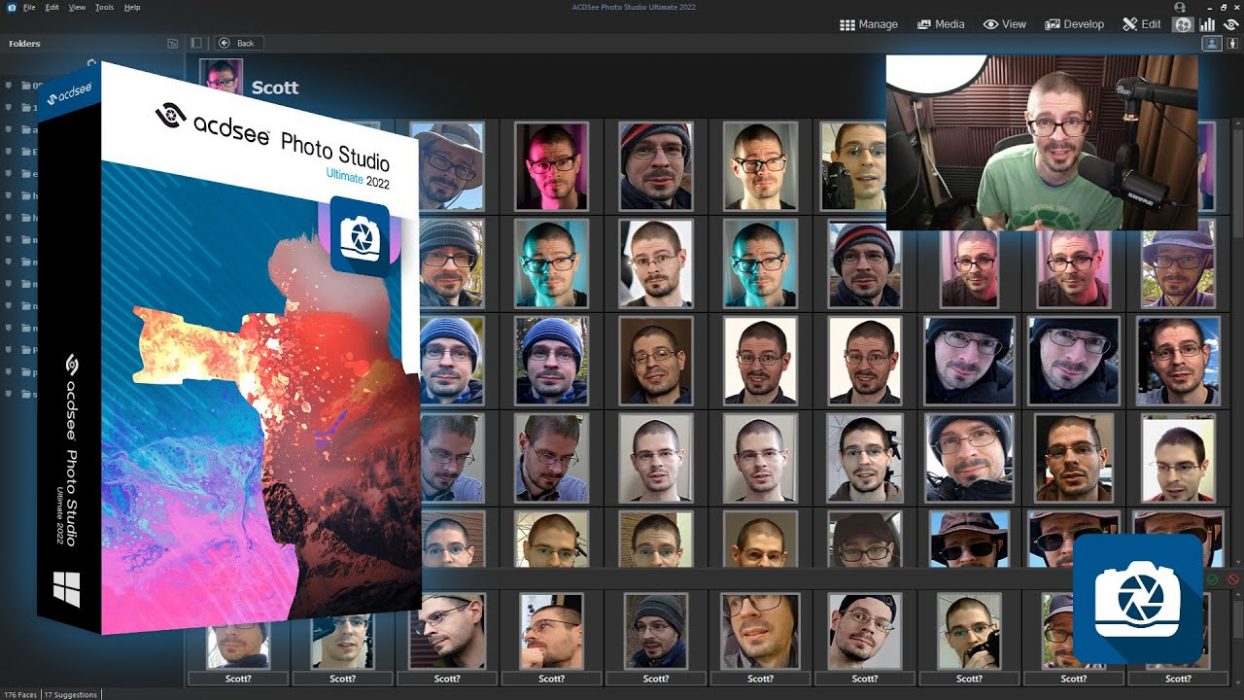
Photo editing is a significant part of graphics design these days. With professional tools available in various forms and sizes, you can almost edit photos in any way you want. But the quest for more simplified yet professional photo editing softwares never stops. This article comes with a review of trustworthy photo editing software. The ACDSee Photo Studio got some significant updates in 2022, and let’s dive into the details of these features. What’s New in ACDSee Ultimate 2022? The ACDSee Ultimate provides top-tier photo management and editing for Windows PC. It offers layer-based editing and raw processing along with other photo management tools. ACDSee is unique because it allows for all the tools that can help you with your digital photography in one place. The 2022 upgrade is a modest one. It has practical management tools for face recognition photos, and the color wheel is also there. Users using their 2019 version should upgrade to the latest ones because there are many new updates, including increased processing speed. Nevertheless, it is a one-in-all product that combines Adobe Lightroom and Photoshop features and additional customizable options. How Much Does ACDSee Cost? The ACDSee is a premium software, and it comes at $149. At this price point, it is not a bad deal. The deal is a no-brainer Considering all the photo editing tools in just one place and lifetime access to these tools. Manage You Photos With Photo Management ACDSEE This tool helps you to arrange all your photos in one place. If your camera has a GPS, you can also use their map feature, which organizes all your photos according to their location. If a GPS is unavailable in your camera, you can geotag these images by dragging them to specific places on the built-in map. Nevertheless, it is a fantastic tool for sorting your photos in one place. Face Recognition The new upgrade in the 2022 version helps you to tag photos with the help of facial recognition. You can turn on this feature for a photo, and after the algorithms determine a face in that photo, it will help you separate all the images in your archive in which that face is present. The possible complaint from most users is that the whole process is slow. Nevertheless, it is still an innovation in photo editing softwares. You can access this feature in the People’s Tab. Photo Viewer The View Tab lets you view the image you have added to its archive. The tool allows you to magnify the pictures and gives access to all the photo management tools in one place. Raw Editor This tool is a competitor of Adobe Lightroom; it has all the features to retouch your photos and remove objects and backgrounds. It can help you ultimately change the colors of your images. The Color Wheel tool of this Raw Editor allows you to modify colors without changing the picture’s overall tone selectively. Layer-Based Editing The Develop Tab comes with this layer-based photo editing, which allows you to add or remove layers in your image. It keeps the original image intact and allows freehand editing, which is impossible in non-layered editing. Final Verdict With some of the most advanced photo editing tools, the ACDSee is one of the rising stars in this industry. It comes with a single-time purchase which gives lifetime access to their software. Nevertheless, it is one of the market’s most fantastic content creation tools.

Read More
Photography Software

Topaz Image Quality Bundle Review – A Photographer’s Lifeline

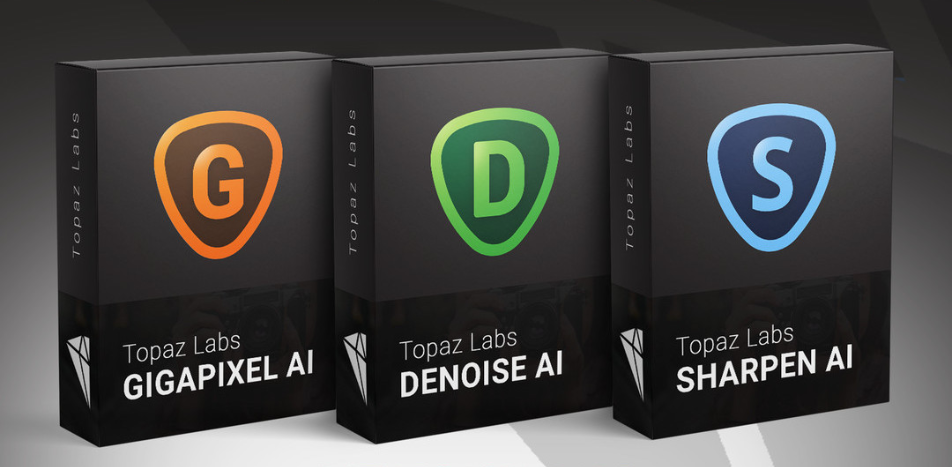
With the image editing bundle in your hands, you now have the most affordable yet efficient softwares to create the best quality photos. The Topaz bundle comes with three softwares. One is the noise reduction software Denoise AI, and the other is for enlarging your digital images, Gigapixel AI. The star of this bundle is Sharpen AI which provides sharpness in your pictures and reduces motion blur. You can also use this softwares independently, but it will cost more than the bundle itself. This article comes with a review of this bundle and how it can help you create professional images. Gigapixel AI The Gigapixel AI is upscaling image software that can help you create some of the best-enlarged images. You can enlarge them as far as 600%. The perk comes with all the details that the machine learning algorithms of this software automatically add to the enlarged images. The original photo may appear out of focus when you zoom in normally, but you will find apparent cut differences using Gigapixel AI. Denoise AI Noise reduction in images is crucial for restoring the original image. You can get better quality photos with a lens or sensor upgrade of your camera or use this software. Denoise AI will deliver results to some extent by adding more details to your image. If you are shooting photographs in a noisy environment, the software can give you a second chance before you delete the photo. The AI recommendations are usually enough, but you can always add a few tweaks manually, which comes with the software. Sharpen AI The software uses some of the best machine learning algorithms to add sharp lines and correct blur in these images. The other softwares complete this job by masking the soft image while Sharpen AI works on improving motion blur and adding artifacts. Pricing The image quality bundle from Topaz comes at $159.99 software today. The website has a $99 discount up until August 12, 2022. There is a 15% off by using the Promo code FRIEND15. If we consider the individual prices of these softwares, Gigapixel AI comes for $99.99, the Denoise AI software has a price tag of $79.99, and Sharpen AI comes at $79.99. There is a special discount while buying the image quality bundle. The fantastic thing is that you can purchase this softwares at once and use them for a lifetime. Plus, there is 24/7 live support if you want to know anything. Conclusion If you are a professional digital photographer and want perks available from the classic Adobe softwares, you can start using the Topaz Bundle. These softwares are competing and leading in this market, and the best part is that these softwares are available at affordable rates. So you should check them out before going for high-end softwares. The individual softwares come with a lifetime free trial, but the edited images will have a watermark of the software’s name. So, you can avail the discount by purchasing this bundle which provides value for your investment.  

Read More