

Skylum built Luminar Neo around a simple promise: the edits that normally take a pile of layers, masks and brush strokes should take a slider or two instead. Launched on 17 February 2022 as the successor to Luminar 4, it arrived with Sky AI, Face AI, Portrait Bokeh AI and a modular engine that made the app noticeably faster than the version it replaced. Four years and a string of free and paid upgrades later, the desktop editor looks very different: layers, a real generative toolkit, a rebuilt masking system, and a 2026 fall release that finally made the AI output look like it came from a camera rather than a filter. This updated review covers what Luminar Neo does today, what changed in 2026, what it costs, and where it still falls short of Lightroom.
Luminar Neo at a Glance
Quick Facts
- Developer: Skylum Software, released 17 February 2022 as the successor to Luminar 4
- Platforms: macOS and Windows desktop, plus iOS, Android and ChromeOS through Luminar Mobile
- Role: Standalone editor and plug-in for Photoshop, Lightroom Classic and Photos for macOS
- Toolset: 24+ AI-based tools and 100+ individual features across seven tool categories
- Pricing: One-time purchase from $119 for desktop, $159 cross-device, $179 for the Max bundle
- Trial: 7 days free with full tool access, no credit card, 30-day money-back guarantee after purchase
- Best for: Landscape, travel and portrait photographers who want fast AI edits without a monthly subscription
What Luminar Neo Does
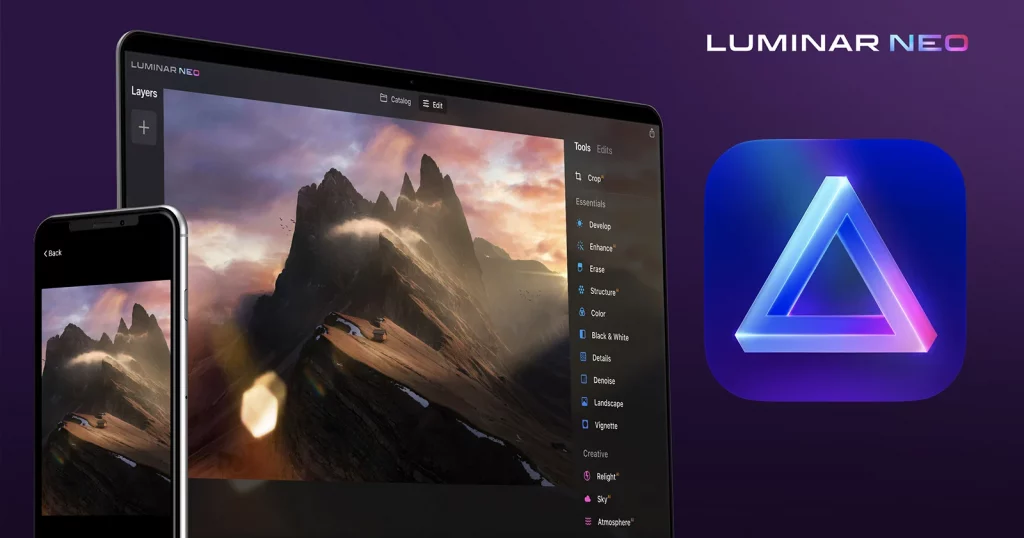
The core idea has not changed since launch. Instead of building a mask before you can touch the sky, Luminar Neo reads the image first: it separates sky from land, subject from background, water from rock, and then puts a slider on top of that analysis. Sky AI swaps a dull sky for one of 35 built-in skies, re-lights the foreground to match, and even adjusts reflections and colour casts elsewhere in the frame so the composite holds together. Face AI and Skin AI handle the portrait side without manual masking, while Portrait Bokeh AI isolates a subject and defocuses everything behind it using a depth map rather than a lens.
Where the app has matured most is in what surrounds those headline tools. Luminar Neo now runs a genuine layer stack with 14 blend modes, opacity control, and brush, linear and radial gradient masks. Adjustment tools can be applied repeatedly and in any order, and a full layer stack with masks can be saved as a preset for reuse. Local adjustments, curves, dodge and burn, colour tools, lens correction, RAW development and a crop tool that suggests compositions all live in the same workspace, so the AI features are a starting point rather than the whole workflow.
What Changed in 2026
The 2026 releases are the reason this review needed rewriting. Three updates landed in sequence, and the fall one is the most substantial.
Spring 2026 (v1.27)
Skin AI split into separate skin and face controls with a new blemish slider. Face AI added under-eye dark circle removal that keeps working on turned heads. Bokeh AI extended to objects as well as people, and masks gained feathering for softer edges.
Summer 2026
Catalogue, Presets and Edits merged into one workspace: browse on the left, tools on the right. Masking now uses up to 33% less memory, preset previews load up to 4x faster, and export is up to 25% quicker. GenErase, GenSwap and GenExpand were retuned for more natural fills.
Fall 2026 Upgrade
Atmosphere 2.0 rebuilds fog on a 3D depth map, so mist can sit in a valley without washing over the ridge in front. Crop 2.0 suggests compositions from the rule of thirds and golden ratio. Enhance AI 2.0 was retrained to stop over-cooking highlights, and AI Assistant 2.0 can critique a photo and propose fixes.
Also New
A proper print screen with a large preview and optional signature or watermark, plus Luminar Web, a browser version of the editor that ships with the All Platforms and Max licences. The desktop app is now marketed simply as Luminar.
The Tools That Earn Their Place
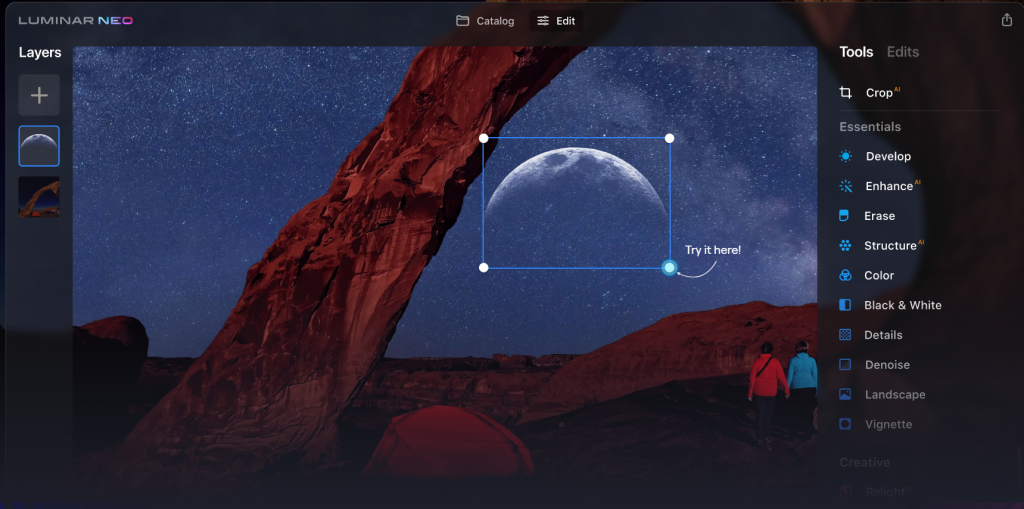
Not every tool gets used equally, and the ones that matter tend to be the ones you reach for on every shoot:
Enhance AI
One slider adjusts exposure, shadows, highlights, contrast, colour and detail together. The 2026 retune keeps highlights intact and colours neutral, so it is a usable base edit rather than a look.
Sky AI
The headline feature since launch. Masking holds up on awkward edges like bare branches and antenna masts, and the relight step is what sells the illusion.
Light Depth and Relight
Builds a depth map of the scene so foreground and background brightness and warmth can be moved independently. It behaves less like a global curve and more like relighting a set.
Portrait Suite
Skin, Face and Body AI cover smoothing, shine, blemishes, eyes, teeth, dark circles, facial light and proportion. Studio Light and Background Removal round it out.
Generative Tools
GenErase paints out distractions and rebuilds the gap, GenSwap replaces a selected object from a text prompt, GenExpand widens a frame beyond its original edges.
Pro Tools
HDR Merge, Panorama Stitching, Focus Stacking, Upscale, Noiseless AI and Supersharp AI handle the multi-frame and rescue work most editors charge extra for.
Layers and Masking
14 blend modes, opacity, brush and gradient masks, plus Mask AI and Object Select AI that pick out people, sky, water, flora, architecture and transport automatically.
AI Assistant
Describe the look you want and it chains 20+ tools to build it, or ask for an opinion and it suggests improvements. Useful early on, optional once you know the app.
Luminar Neo vs Lightroom and Photoshop
| Capability | Luminar Neo | Lightroom | Photoshop |
|---|---|---|---|
| Sky replacement | Built-in, one click with relight | Manual masking | Manual masking and compositing |
| Portrait retouching | Face, Skin, Body, Bokeh AI | Basic healing and masking | Fully manual, most control |
| Object removal | Erase plus GenErase | Heal and generative remove | Generative fill |
| Catalogue and metadata | Albums, folders, basic filtering | Class-leading library and keywords | Bridge only |
| Multi-frame tools | HDR, panorama, focus stacking built in | HDR and panorama built in | Manual stacking |
| Licensing | One-time purchase available | Subscription only | Subscription only |
Luminar Neo does not try to replace your library. It also does not try to replace Photoshop’s precision. What it does better than either is the middle ground: a RAW file that needs a strong base edit, a sky that needs replacing, a portrait that needs cleaning up, all finished in minutes instead of an evening. If your work depends on keywording tens of thousands of images or on pixel-level compositing, you will keep Lightroom or Photoshop open next to it. That is exactly why the plug-in route exists, and why installing into Lightroom Classic or Photoshop takes one checkbox during setup.
Pricing in 2026
The 2022 launch price of $79 is long gone. Skylum now sells three perpetual licences, and the difference between them is breadth of access rather than tools inside the desktop app.
| Licence | Price | What You Get |
|---|---|---|
| Desktop Perpetual | $119 one-time | Desktop app on 2 machines, all current tools, 1 year of generative AI and Prime features |
| Cross-Device Perpetual | $159 one-time | Adds Luminar Mobile on 3 devices, mobile-to-desktop handoff and Spaces web galleries |
| Max Perpetual | $179 one-time | Everything above plus a year of Luminar Prime and the creative asset library |
| Luminar Prime | Around $6 to $8 per month | Keeps generative tools, Restoration, AI Assistant and asset library alive after year one |
The catch to read carefully is the one-year clock. On every perpetual licence, GenErase, GenSwap, GenExpand, Restoration and AI Assistant stop working 365 days after purchase unless you add Luminar Prime. Core AI tools such as Sky AI, Enhance AI, Light Depth, Face AI and the Pro Tools keep working for as long as the licence does. In practice that makes the purchase a perpetual licence for the editor and a renewable subscription for the newest generative layer, which is a fairer structure than renting the whole application but is still easy to misread on the checkout page.
Before you buy: Skylum runs frequent discounts, loyalty pricing for previous Luminar owners, and education pricing, so the figure on the pricing page is rarely what you end up paying.
Use promo code SILENTPEAKNEO10 at checkout if it is still active on your visit. Codes rotate with each campaign, so confirm the discount appears on the order summary before you complete payment, and remember the 7-day trial and 30-day refund window let you test the app first.
Which Kind of Photographer Should Buy It
| If you shoot | Start with | Why it fits |
|---|---|---|
| Landscapes | Sky AI, Atmosphere 2.0, Light Depth | Sky swaps, believable fog and separate foreground light in one pass |
| Portraits | Skin AI, Face AI, Bokeh AI | Retouching without masks or brush work, with texture left intact |
| Travel | GenErase, Erase, Water Enhancer | Tourists, cables and bins disappear without a cloning session |
| Wildlife and macro | Noiseless AI, Supersharp AI, Focus Stacking | High ISO cleanup and depth-of-field merging without extra apps |
| Family archives | Restoration, Upscale, Face AI | Scratches vanish, faded prints regain colour, small frames go bigger |
Performance and Workflow in Real Use
The modular engine that shipped in 2022 still holds up, and the 2026 optimisation pass helped where it was needed most. On high-resolution files the app is comfortable in ordinary adjustments but shows its weight when several AI passes stack up: Sky AI, Body AI and a generative fill on one 45-megapixel frame can take a few seconds each, and on a modest laptop that means waiting. On a current Apple Silicon machine or a desktop with a mid-range GPU, the same sequence feels immediate. Everything is non-destructive, so the originals stay untouched and any step can be revisited later, which matters more than raw speed once a shoot runs to hundreds of frames.
Two small quirks remain worth knowing before you commit. Previews inside the catalogue can look slightly different from the final render, so judge an edit after export rather than by thumbnail. And the tool panel has grown to the point where there is still no search field, which means the fastest way to work is to build a habit around the handful of tools you actually use and pin presets you like. Those are workflow complaints, not quality complaints: the output itself is consistent.
Around those core tools sits an ecosystem that mostly stays out of the way. The app is fully offline except for the three generative tools, the interface ships in sixteen languages, RAW support covers over a thousand camera models including CR2, CR3, NEF, ORF and RAF, and exports land as JPEG, PNG, TIFF or PSD. Installing as a plug-in into Lightroom Classic, Photoshop or Photos for macOS is a checkbox during setup, and edits round-trip back into the host application as a new layer.
System Requirements
| Component | Minimum |
|---|---|
| Operating system | macOS 12.0 or later; Windows 10 build 1909 or later, 64-bit only |
| Processor | Intel Core i5 8th gen or AMD Ryzen 5; Apple M1 and newer supported |
| Memory | 8 GB minimum, 16 GB or more recommended for layered edits |
| Storage | 10 GB free space, SSD strongly advised |
| Graphics and display | OpenGL 3.3 compatible GPU, 1280 x 768 screen or better |
Frequently Asked Questions
Is there a free version of Luminar Neo?
No permanent free tier, but the 7-day trial unlocks every tool with no card required, and purchases carry a 30-day money-back guarantee.
Does Luminar Neo work as a Lightroom or Photoshop plug-in?
Yes. It installs as a plug-in for Lightroom Classic 6 and later, Photoshop CS5 and later, and Photos for macOS, while still running as a standalone application.
What happens to the AI tools after one year?
Core tools such as Sky AI, Enhance AI, Light Depth and the Pro Tools stay available for the life of the licence. GenErase, GenSwap, GenExpand, Restoration and AI Assistant need Luminar Prime to continue.
Can one licence cover both a Mac and a Windows PC?
Yes. A perpetual desktop licence activates on two machines in any combination, and licences can be reset from your Skylum account when you change hardware.
Pros and Cons
✅ Pros
- AI tools that genuinely save time: Enhance AI, Sky AI and Light Depth carry a whole edit
- Perpetual licence available, so the editor itself is not a rental
- Genuine layer stack with blend modes, masks and reusable layer presets
- Built-in HDR merge, panorama stitching, focus stacking, upscaling and noise reduction
- Works standalone or as a plug-in for Photoshop, Lightroom Classic and Photos for macOS
- 2026 upgrades look far more natural: 3D fog, retrained Enhance, smarter crops
- One licence covers desktop, mobile and web on the higher tiers
○ Cons
- Generative tools, Restoration and AI Assistant expire after 365 days without Luminar Prime
- Catalogue and file management remain far behind Lightroom for large libraries
- Pricing structure changes almost every year, which makes comparison difficult
- Heavy AI passes are resource hungry and can stall on older hardware
- Major future upgrades may still be charged separately
- Persistent in-app promotion of asset packs you have not bought
Verdict
★★★★½
Overall Score: 9.2/10
Luminar Neo has grown from a preset-driven quick fix into a complete editor with a layer stack and a real generative toolkit, and the 2026 updates finally made the output look photographic. For landscape, travel and portrait photographers who want professional-looking results without learning a masking workflow, it remains the fastest route from RAW to finished frame. Buy it if the editing is the bottleneck. Look elsewhere if your bottleneck is organising a hundred thousand photos, or if you need pixel-level control that only Photoshop provides.
Try the 7-day trial on a shoot you already know well, edit the same three files you would normally spend an evening on, and compare the time. That test tells you more than any feature list, and it costs nothing.
Disclosure: This review contains an affiliate promo code. We may earn a commission if you buy through it, at no extra cost to you. Pricing and promo terms are set by Skylum and can change without notice.
*FTC Disclosure:All products recommended by LooPReview are selected by our editorial team, independent of our website. Some of our stories include affiliate links. If you buy something through one of these links,we may earn an affiliate commission.*
Leave feedback about this