


*FTC Disclosure:All products recommended by LooPReview are selected by our editorial team, independent of our website. Some of our stories include affiliate links. If you buy something through one of these links,we may earn an affiliate commission.*
Xero is an affordable, cloud-based accounting software built for small to mid-sized businesses. It shines with advanced general ledger controls, streamlined invoicing, and unlimited user access across all plans. While its interface feels dated in places and customer support is limited, it remains one of the best value picks on the market, especially for service-based and contracting businesses.
At a Glance
- Best for: Small businesses, freelancers, and service-based companies
- Starting price: $15/month (Early plan)
- Free trial: 30 days, plus 95% off first 3 months
- Standout feature: Unlimited users on every plan
- Top integration: Seamless Gusto payroll sync
What Is Xero?
Xero is a fully online accounting software platform designed for businesses of all sizes and industries. It was built to replace desktop bookkeeping tools with a cloud-native solution that you can access from any browser or mobile device.
While it works for nearly any business model, Xero’s project tracking and job-costing features make it especially well suited for service-based contracting businesses that manage multiple clients and individual projects.
One of its biggest differentiators is pricing: every plan includes unlimited user seats, which sets it apart from competitors like QuickBooks and FreshBooks that charge per additional user. For teams with multiple accountants or staff members, this can translate to massive savings.

Key Features
General Ledger Control
Manage all company transactions, add custom accounts, and create advanced journal entries with auto-reversing dates.
Invoicing & Bill Pay
Create, approve, and email invoices directly from the platform. Pay bills and consolidate outstanding balances in one click.
Project Time Tracking
Track time per project with a built-in timer, then auto-generate invoices based on billable hours.
Bank Reconciliation
Securely connect bank accounts and reconcile transactions with suggested matches and bulk actions.
Contacts Management
Organize customers and suppliers, store banking details, and attach documents to contact records.
Gusto Payroll Integration
Seamlessly sync with Gusto for full payroll processing. Transactions automatically flow into Xero books.
Pros & Cons
✅ Pros
- Advanced, highly functional general ledger system
- Streamlined invoicing and bill payment workflow
- Low-cost plans with unlimited users on all tiers
- Excellent mobile app with core accounting features
- Strong bank reconciliation and bulk transaction tools
- 50+ customizable financial reports
- ISO 27001 and SOC 2 certified security
❌ Cons
- Limited customer support — email only, no phone
- No built-in employee time tracking for payroll
- Advanced analytics require paid add-on
- Multiple separate mobile apps can be confusing
Xero Pricing & Plans
Xero uses a straightforward three-tier pricing model. All plans include unlimited users — a major advantage over competitors. Pricing is month-to-month only; there is no annual discount. A 30-day free trial is available, plus a 95% discount for the first three months.
| Plan | Price | Best For | Key Limits |
|---|---|---|---|
| Early | $15/month | Sole traders & micro-businesses | 20 invoices / 5 bills per month |
| Growing | $42/month | Growing small businesses | Unlimited invoices & bills; optional Inventory Plus |
| Established | $78/month | Established businesses with multiple currencies | Multi-currency, projects, expenses; optional Analytics Plus |
Xero vs QuickBooks vs FreshBooks: Cost Comparison
The biggest financial advantage of Xero becomes clear when you compare pricing across multiple users. Since Xero includes unlimited seats, the gap widens dramatically as your team grows.
| Team Size | Xero (Growing) | QuickBooks (Plus) | FreshBooks (Premium) |
|---|---|---|---|
| 1 User | $42/mo | $115/mo | $65/mo |
| 3 Users | $42/mo | $115/mo | $87/mo |
| 5 Users | $42/mo | $115/mo | $109/mo |
| 10 Users | $42/mo | ~$350/mo (Advanced + extra seats) | $164/mo |
Usability & Interface
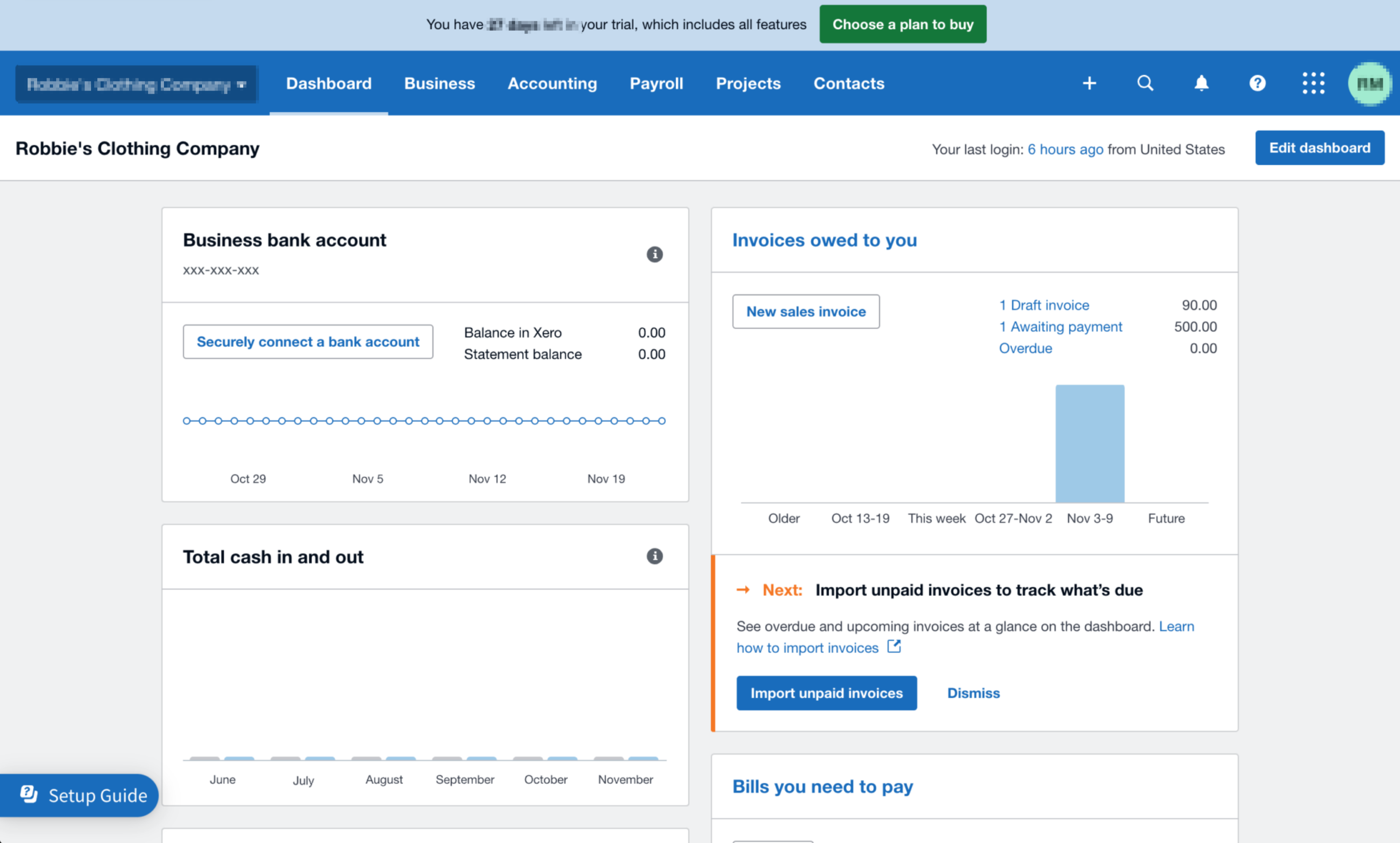
Xero’s interface is reasonably intuitive but inconsistent across different sections. The main dashboard is well designed, with a clean blue-and-white theme and a top navigation bar that puts key sections within easy reach.
The home dashboard gives you an at-a-glance view of your business financial health: bank balances, outstanding invoices, cash flow trends, and upcoming bills. This is genuinely useful for quick daily check-ins.
However, the Chart of Accounts page feels noticeably outdated compared to the rest of the software. It uses a denser, older design language that clashes with the modern dashboard. Given how frequently accountants access this page, it’s a surprising weak point.
Overall navigation is mostly intuitive — buttons and submenus are generally where you’d expect them. That said, some common tasks (like finding customer support or setting up the Gusto integration) aren’t obvious and may require searching the help center.
Mobile App
The Xero Accounting mobile app (iOS and Android) is excellent. While it doesn’t include every deep accounting feature (you can’t edit the full chart of accounts or run advanced reports on mobile), it handles all the day-to-day tasks beautifully.
The bottom-tab navigation splits into four sections: Dashboard, Sales, Purchases, and Contacts. You can create and send invoices, photograph receipts, reconcile transactions, view profit summaries, and manage contacts — all from your phone.
Xero also offers three additional dedicated apps:
- Xero Verify — 2FA authenticator app for secure login
- Xero Projects — Job quoting, time tracking, and project invoicing on the go
- Xero Me — Employee self-service for payslips, expense claims, leave requests, and timesheets
Having separate apps keeps each one focused but can feel fragmented for users who need all of the above.
Core Functionalities Deep Dive
General Ledger
This is where Xero truly excels. The general ledger system is robust and packed with advanced features you’d expect from enterprise software. Adding new accounts is fast — a simple pop-up window lets you configure account type, code, name, and tax settings without page reloads.
Journal entries support tax-inclusive or tax-exclusive amounts, auto-reversing dates for accruals, and file attachments for audit documentation. For growing businesses that need clean, audit-ready books, this level of control is a big win.
Invoicing & Bill Pay
Xero’s invoicing workflow is smooth and efficient. You can create an invoice, approve it, and email it to your client directly from the platform — no need to export PDFs and switch to your email client.
A particularly smart touch: when creating a new bill for a supplier with existing outstanding purchase orders, Xero prompts you to copy line items over in one click. This is great for consolidating payments and avoiding missed balances.
Time Tracking
Xero offers project-level time tracking (with a built-in timer and manual entry options) that works well for billing clients by the hour. You can generate invoices directly from tracked time.
However, it’s not employee payroll time tracking. There’s no built-in clock-in/clock-out system for staff, no geofencing, and no payroll-ready timesheets. For that, you’ll need a third-party tool like Connecteam or rely on manual timesheet entry via Xero Me — which is error-prone and time-consuming.
Payroll via Gusto Integration
Xero does not have native payroll. Instead, it partners deeply with Gusto. Once connected, running payroll in Gusto automatically posts the corresponding transactions to Xero, keeping your books up to date with minimal manual work.
The setup process could be clearer — the connection must be finalized from the Gusto side, not Xero’s, which isn’t well documented. But once configured, the integration works seamlessly. Single sign-on and payroll alerts inside Xero are nice quality-of-life touches.
Security Features
Xero takes data security seriously, with 2-factor authentication (via Xero Verify or third-party apps), full data encryption at rest and in transit, and regular SOC 2 audits. It’s also ISO/IEC 27001:2013 certified and PCI DSS v3.2 compliant for payment processing.
The main caveat: Xero is not HIPAA compliant. If you’re in healthcare and need to process patient-related financial data that contains PHI, Xero would not be an appropriate choice.
The mobile app supports biometric login (fingerprint / face recognition), and Xero provides a dedicated phishing report email (phishing@xero.com) for reporting security threats.
Reporting & Analytics
Xero offers over 50 built-in accounting reports covering financial performance, statements, payables/receivables, projects, reconciliations, taxes, and transaction details.
Reports are interactive and customizable — you can adjust date ranges, drill into specific figures to see underlying transactions, and save custom report layouts. Export options include PDF, Excel, and Google Sheets.
The “Short-term cash flow” projection tool is a standout feature that predicts your future cash balance based on outstanding invoices and bills. Note that full functionality requires the Analytics Plus add-on, which is only available on the Established plan.
One area where competitors pull ahead: Xero lacks a conversational AI assistant that can answer natural-language questions about your financial data, a feature offered by platforms like Zoho Books.
Customer Support
Customer support is Xero’s weaker area. Support is available only via email contact form — there’s no phone support line. The contact form is available 24/7, but there’s no guaranteed response time SLA.
Finding the support portal isn’t intuitive either — there’s no obvious “Support” button in the main dashboard navigation; you have to dig through help articles to reach the contact form.
That said, actual response quality and speed can be good — in testing, a query submitted at 4:54 pm received a detailed, helpful reply by 5:02 pm. New trial users also get a personal onboarding text and email from a support representative with calendar booking options, which is a nice touch.
Final Verdict: Who Should Use Xero?
★★★★☆
Overall Score: 8/10
Xero is an excellent choice for small and growing businesses that want powerful accounting capabilities at an affordable price. It’s particularly well suited for:
- Service-based businesses and contractors managing multiple client projects
- Teams with multiple users who want to avoid per-seat pricing
- Businesses that already use or plan to use Gusto for payroll
- Companies that need strong general ledger and reporting capabilities
It’s not ideal for healthcare businesses handling PHI (no HIPAA), companies that need built-in employee time clock functionality, or anyone who requires phone-based customer support.
If you need employee time tracking and team communication alongside your accounting, pairing Xero with a workforce platform like Connecteam creates a powerful, integrated solution.
Frequently Asked Questions
Does Xero offer a free trial?
Yes, Xero offers a 30-day free trial on all three plans. New customers also qualify for 95% off the first three months.
Is Xero HIPAA-compliant?
No, Xero is not HIPAA-compliant. It should not be used to process transactions involving protected health information (PHI).
How many users can I add to Xero?
All Xero plans include unlimited users. There’s no per-seat charge, which is one of its biggest advantages over QuickBooks and FreshBooks.
Disclosure: Some of the links in this review are affiliate links. We may earn a commission at no extra cost to you if you sign up through our links. This does not influence our evaluations.